
- Alignment keeps lyrics you provide and finds when each word is sung.
- Transcription listens to the performance, writes the lyrics, and times the words.
Quick picker
Transcription models
AudioShake
AudioShake transcribes the recorded performance and shows a medium cost tier. Results vary by recording, language, vocals, and mix, so compare models when the first result needs substantial correction.ElevenLabs Scribe
ElevenLabs Scribe creates timed lyrics from the original performance. The app shows a low cost tier, supports Auto-detect, and accepts a broad set of language hints. On some songs it can produce a better first pass than AudioShake and leave fewer corrections, so it is worth trying when another model misses the mark. If you supply lyrics, Scribe uses them to improve vocabulary recognition. It does not align that text word for word, so review the resulting words and line grouping. Use an alignment model when the supplied text must remain unchanged.MusicAI
MusicAI is another transcription option for songs with clear vocals. The app shows four quality dots and a high cost tier.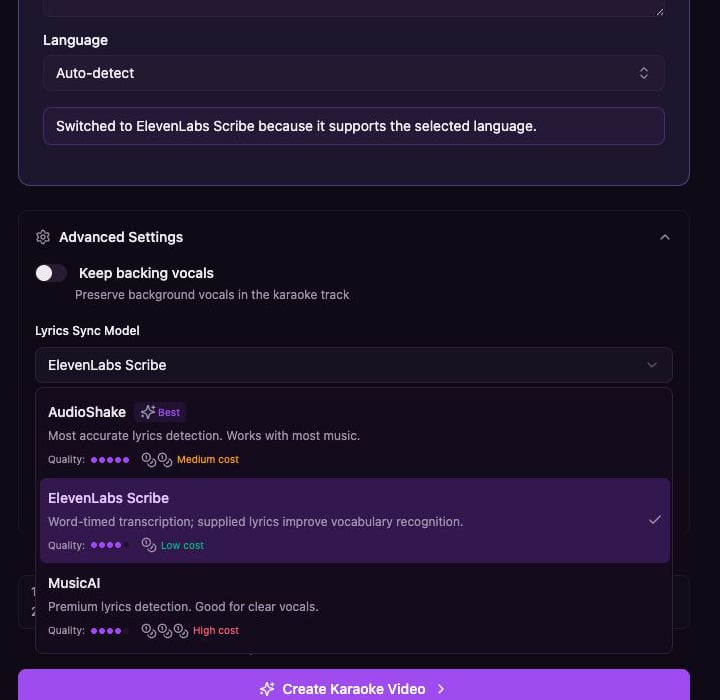
Alignment models
Use alignment when you already have the correct lyrics and want Youka to place those words on the timeline.- AudioShake alignment preserves the supplied lyric text while placing it on the timeline.
- MusicAI alignment provides alternative word-level or subword-level timing when available in the selected workflow.