
Create from the audio
1
Choose Auto-transcribe
Open Create Karaoke Video and select Auto-transcribe under Song
Lyrics.
2
Add optional lyric hints
If you know the lyrics, paste them into the optional lyrics box. They can
help ElevenLabs Scribe recognize names, unusual words, and vocabulary, but
Scribe still transcribes the recorded performance.
3
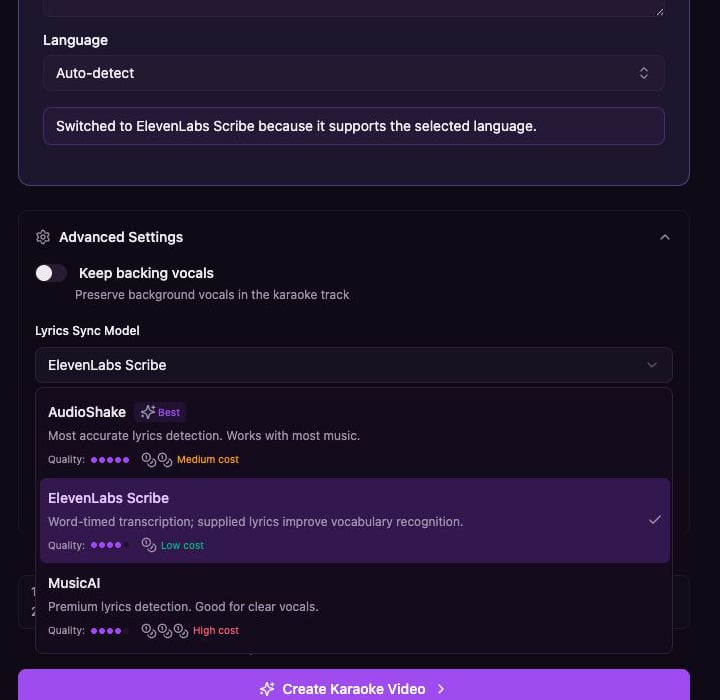
Choose the language
Keep Auto-detect or select the song language. Youka checks whether the
selected lyrics model supports that choice.
4
Choose a lyrics model
Open Advanced Settings, then choose a Lyrics Sync Model. See Choose
a lyrics sync model for a full comparison.
5
Create and review
Check the displayed credit estimate, create the karaoke, then review the
words and timing in Studio.
Which model should I try?
What supplied lyrics mean for Scribe
ElevenLabs Scribe is a transcription model. Supplied lyrics are vocabulary hints, not a script that must be preserved exactly. Scribe may change words, punctuation, or line grouping to match what it hears in the performance. Use an alignment model instead when preserving your exact lyric text is more important than transcribing the recorded words. See Choose a lyrics sync model.Review the result
Auto-transcription works best with clear vocals and limited background noise. After creation, check:- Names, uncommon words, and stylized pronunciation
- Repeated choruses and overlapping vocals
- Line breaks and singer assignments
- Word timing around instrumental sections