> ## Documentation Index
> Fetch the complete documentation index at: https://docs.youka.io/llms.txt
> Use this file to discover all available pages before exploring further.
# Create and manage saved playlists
> Save ordered sets of karaoke videos for rehearsals, parties, and recurring sets
Saved playlists let you organize Library videos into reusable, ordered sets. Your playlists stay synced with your Youka account in Youka Online and Youka Desktop.
 ## Create a playlist
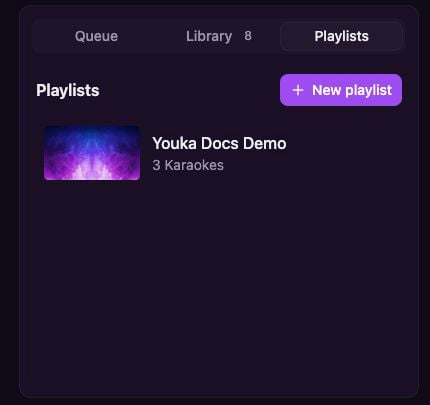
Open **Library**, then select the **Playlists** tab.
Select **New playlist**, enter a name, and save it.
Return to the **Library** tab, open a Karaoke's actions menu, and select **Add to playlist**.
## Create a playlist
Open **Library**, then select the **Playlists** tab.
Select **New playlist**, enter a name, and save it.
Return to the **Library** tab, open a Karaoke's actions menu, and select **Add to playlist**.
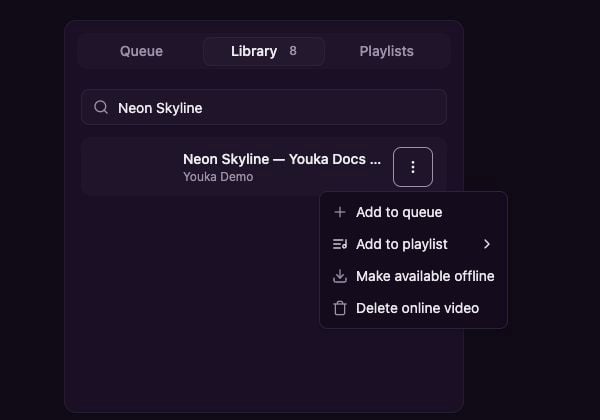 You can add the same Karaoke more than once when your set needs a repeat.
## Play and reorder a playlist
Open **Library → Playlists**, then select a playlist.
You can add the same Karaoke more than once when your set needs a repeat.
## Play and reorder a playlist
Open **Library → Playlists**, then select a playlist.
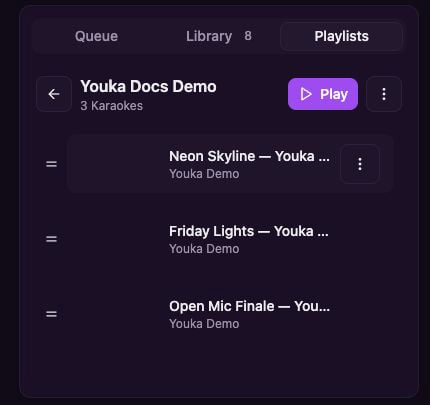 * Select **Play** to replace the current Queue and start from the first Karaoke.
* Drag the handle beside a Karaoke to change its position.
* Open a Karaoke's actions menu to remove that occurrence from the playlist.
* Open the playlist actions menu to rename or delete the playlist.
Deleting a playlist does not delete its Karaokes from your Library.
## Playlists and the Queue
A **playlist** is a saved set you can use again. The **Queue** is the temporary play order for the current session. Starting a playlist replaces the current Queue with that playlist's Karaokes.
Saved playlists require an internet connection. To prepare for an offline event, make the finished videos available offline before disconnecting, then build and use the Queue on that device. See [Use Youka offline](/en/web/offline-library).
* Select **Play** to replace the current Queue and start from the first Karaoke.
* Drag the handle beside a Karaoke to change its position.
* Open a Karaoke's actions menu to remove that occurrence from the playlist.
* Open the playlist actions menu to rename or delete the playlist.
Deleting a playlist does not delete its Karaokes from your Library.
## Playlists and the Queue
A **playlist** is a saved set you can use again. The **Queue** is the temporary play order for the current session. Starting a playlist replaces the current Queue with that playlist's Karaokes.
Saved playlists require an internet connection. To prepare for an offline event, make the finished videos available offline before disconnecting, then build and use the Queue on that device. See [Use Youka offline](/en/web/offline-library).