> ## Documentation Index
> Fetch the complete documentation index at: https://docs.youka.io/llms.txt
> Use this file to discover all available pages before exploring further.
# Fix lyric line breaks
> Split and join lyric lines without changing their words or timing
Use **Fix line breaks** when the words are timed correctly but grouped into awkward or overly long lines. You can split or join lines without running AI sync again.
 ## Open the editor
1. Open a completed Project in **Studio**.
2. Select **Fix line breaks** beside **Manual Sync**.
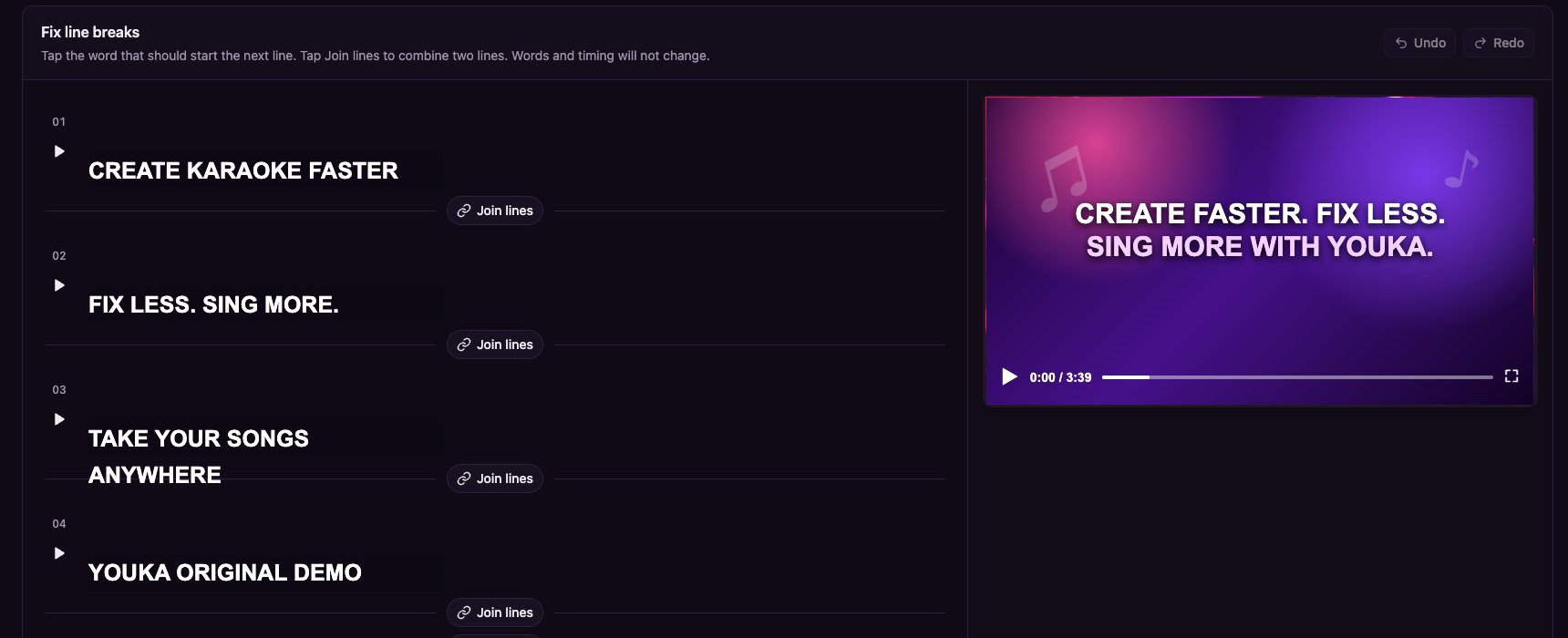
The editor shows every timed line. A **May wrap on screen** label marks a line that may be too long for the current design.
## Start a new line
Select the word that should begin the next line. Youka moves that word and every word after it into a new line while preserving the existing word timing.
Use the play button beside a line to preview that exact boundary before you continue.
## Join two lines
Select **Join lines** between two adjacent lines. Youka combines their words into one timed line.
If the result is too long for the current design, the editor shows **May wrap on screen** so you can choose a better split point.
## Undo, redo, and finish
* Select **Undo** or **Redo** to review your recent line-break changes.
* Select **Done** when the grouping looks right.
Changes are auto-saved. The words and their timing stay unchanged; only the line grouping is edited.
Use [Manual Sync](/en/web/manual-sync) when a word itself starts or ends at the wrong time. Use **Fix line breaks** when the timing is already correct and only the grouping needs attention.
## Open the editor
1. Open a completed Project in **Studio**.
2. Select **Fix line breaks** beside **Manual Sync**.
The editor shows every timed line. A **May wrap on screen** label marks a line that may be too long for the current design.
## Start a new line
Select the word that should begin the next line. Youka moves that word and every word after it into a new line while preserving the existing word timing.
Use the play button beside a line to preview that exact boundary before you continue.
## Join two lines
Select **Join lines** between two adjacent lines. Youka combines their words into one timed line.
If the result is too long for the current design, the editor shows **May wrap on screen** so you can choose a better split point.
## Undo, redo, and finish
* Select **Undo** or **Redo** to review your recent line-break changes.
* Select **Done** when the grouping looks right.
Changes are auto-saved. The words and their timing stay unchanged; only the line grouping is edited.
Use [Manual Sync](/en/web/manual-sync) when a word itself starts or ends at the wrong time. Use **Fix line breaks** when the timing is already correct and only the grouping needs attention.